

Navigation
Organize pages into groups and tabs in the sidebar.
The navigation array in docs.json controls every entry in the sidebar, in the order it renders.
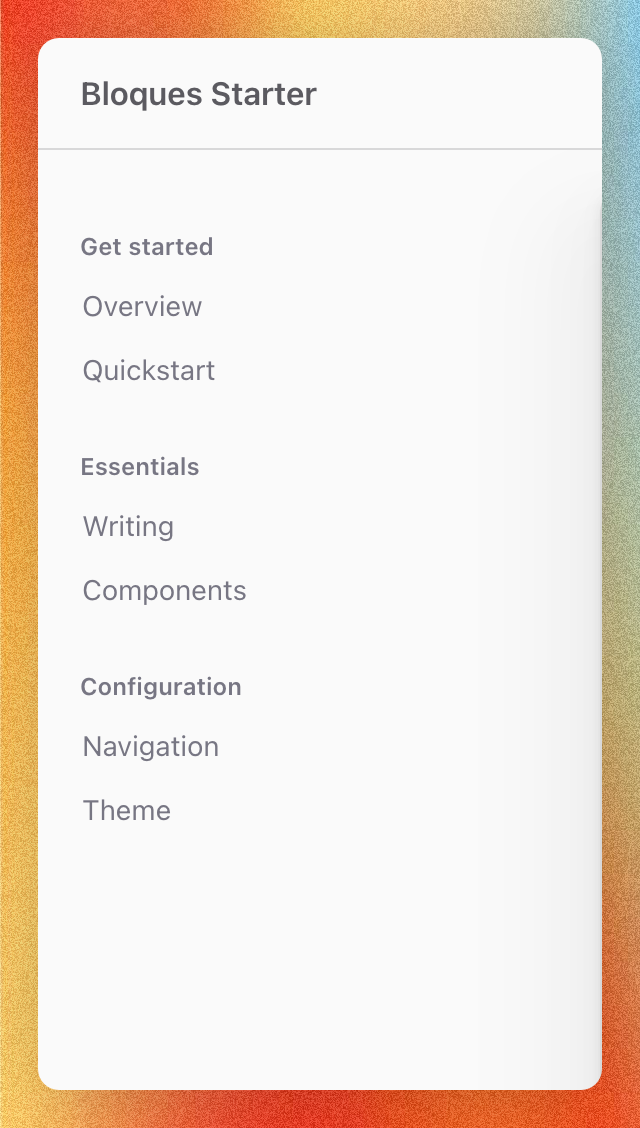
Groups
A group is a labeled section in the sidebar containing a list of pages.
{
  "navigation": [
    {
      "group": "Get started",
      "pages": ["quickstart", "introduction"]
    }
  ]
}
Each string in pages is a path to an .mdx file, repo-relative to the docs directory, without the .mdx extension. The example above points to quickstart.mdx and introduction.mdx at the docs root. Use a subfolder path for nested files: "editor/components" resolves to editor/components.mdx.
Tabs
A tab is a top-level navbar entry that contains its own groups. Use tabs when the sidebar grows past one coherent set of sections, for example, separating a product guide from an API reference.
{
  "navigation": [
    {
      "tab": "Guide",
      "groups": [
        {
          "group": "Get started",
          "pages": ["quickstart", "introduction"]
        },
        {
          "group": "Configuration",
          "pages": ["configuration/docs-json", "configuration/theme"]
        }
      ]
    },
    {
      "tab": "API reference",
      "groups": [
        {
          "group": "Endpoints",
          "pages": ["api/endpoints/create", "api/endpoints/list"]
        }
      ]
    }
  ]
}
Tabs and top-level groups can mix in the same navigation array. Tabs nest groups, but groups don't nest inside other groups, and tabs don't nest inside other tabs.
A group inside a tab can point at an OpenAPI spec with openapi to auto-generate its pages, instead of listing them. See API reference.
Page order
The order of strings in pages is the order they appear in the sidebar. Reorder the array to reorder the sidebar: entries aren't sorted alphabetically. Groups render in the order they appear in navigation, and tabs render in the order they appear in the navbar.
Sidebar labels
Bloques resolves each page's sidebar label in order:
sidebarTitlefrontmatter: an explicit label for the sidebar.titlefrontmatter: the page heading, used whensidebarTitleis absent.- The filename: a fallback when neither field is set.
Set a title and the sidebar matches the page heading. Add sidebarTitle only when the sidebar entry should read differently from the heading: a long heading paired with a short nav label, for example:
---
title: Get started with the Bloques API
sidebarTitle: Quickstart
---
When neither field is set, Bloques builds a label from the filename: hyphens become spaces and each word is capitalized, with short connecting words like "and" or "of" left lowercase. A leading number prefix like 01- is dropped, and an index file takes its folder name. The fallback is best-effort. For exact wording or casing, set a title or sidebarTitle.
In a multi-language site, each language has its own copy of the file, so translate title or sidebarTitle in each one to localize the label.
Group and tab labels come from the group and tab strings in docs.json and are used verbatim: they aren't filenames, so spaces and casing render as written.
Hiding pages
A page only appears in the sidebar if its path is listed in navigation. Drop a path from the array to hide its page from the sidebar without deleting the file. The homepage at index.mdx is intentionally omitted from navigation: it renders at the site root and is reached from the logo, not the sidebar.
Hidden pages stay reachable at their URL. To take a page offline, delete the file or move it out of the docs directory.