

Custom domain
Attach your own domain with DNS setup and automatic HTTPS.
Prerequisites
- A Bloques site that's already deployed. See the Quickstart.
- A domain you own, with access to its DNS settings at your registrar.
Add a domain in site settings
Open site settings
From the site sidebar, select Settings. The General tab opens by default.
Enter your domain
Under Custom domain, type the apex or subdomain you want to attach, for
example docs.example.com.
Add the domain
Select Add. Bloques registers the domain and shows the DNS records to configure next.
Configure DNS records
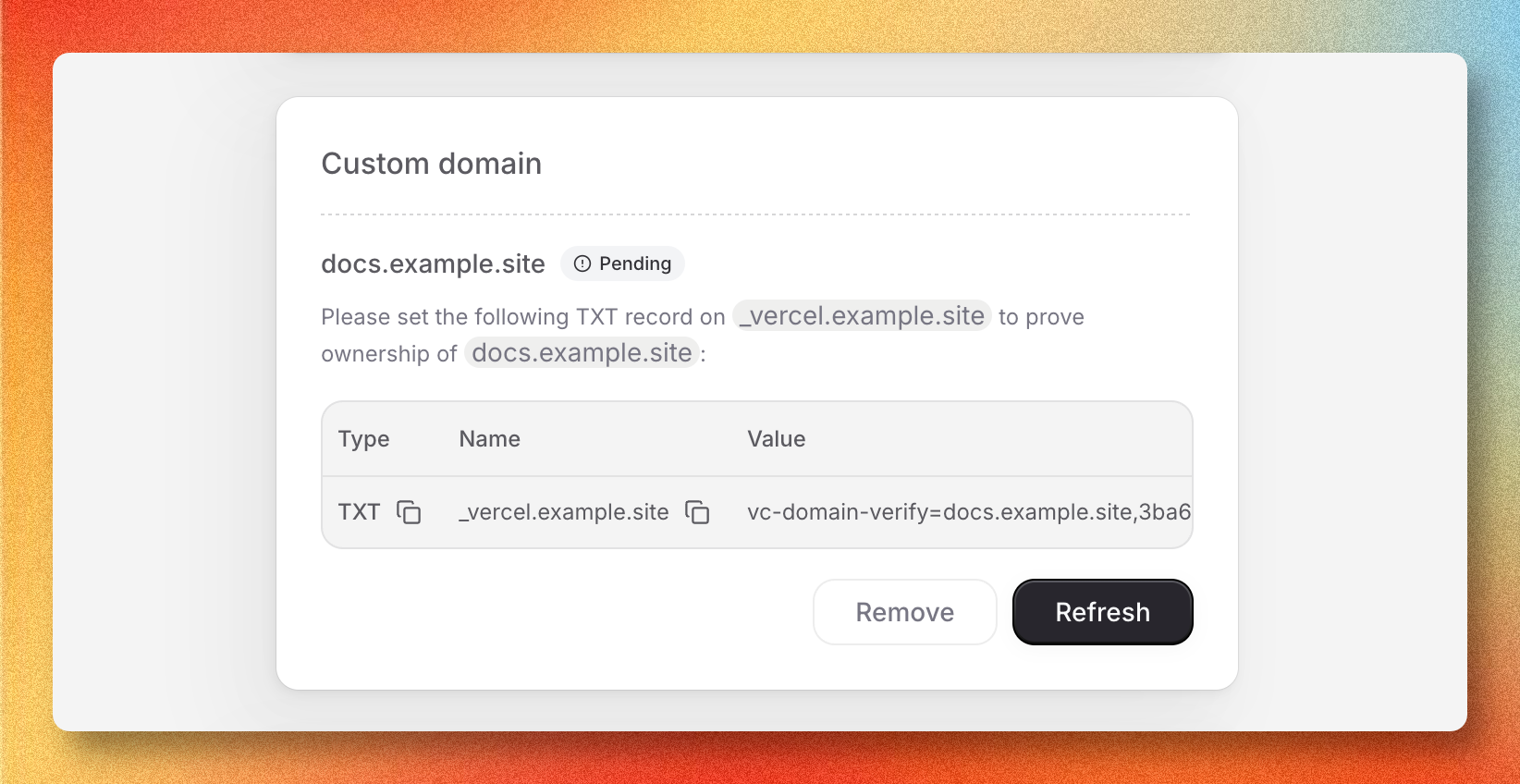
After the domain is added, Bloques displays the exact records to create at your DNS provider. The target values shown in the dashboard are authoritative. Copy them from there rather than hard-coding values from documentation.
| Domain type | Record type | Name | Value |
|---|---|---|---|
Apex (example.com) | A | @ | IP address shown in the Bloques UI |
Subdomain (docs) | CNAME | subdomain | Hostname shown in the Bloques UI |
A pending domain also shows a TXT record on the apex to verify ownership. Add it alongside the A or CNAME record.
DNS changes can take a few minutes to propagate. Some providers cache aggressively, so propagation up to an hour is normal.
HTTPS provisioning
HTTPS is automatic. Once DNS resolves to Bloques, a certificate is issued and renewed for you. Provisioning typically completes within a few minutes of the records going live.
The Custom domain card in site settings shows the current status: Pending while DNS or the certificate are still resolving, Misconfigured if records don't match, and Verified once the domain is serving traffic over HTTPS.
Verify the domain
Open your domain in a new tab. The site loads, and requests over http:// redirect to https:// automatically.
The status badge in site settings refreshes every 20 seconds while a domain is pending. Select Refresh to check immediately.
Troubleshooting
DNS not propagating
The records were added at the registrar but the status stays Pending. Query the records directly with dig example.com or an online DNS lookup to confirm the registrar saved them. If the lookup returns old values, wait for the registrar's cache window (TTL) to expire, then re-check.
HTTPS still pending after 30 minutes
The A or CNAME record resolves but the status hasn't moved to Verified. Confirm the TXT ownership record is also in place. Certificate issuance is blocked until ownership is verified. Select Refresh to retry.
Conflicting AAAA or existing records
An older AAAA record or a stale A/CNAME from a previous host can override the new record and break resolution. Remove any DNS records for the same name that don't point to Bloques, then wait for the cache window (TTL) to expire.